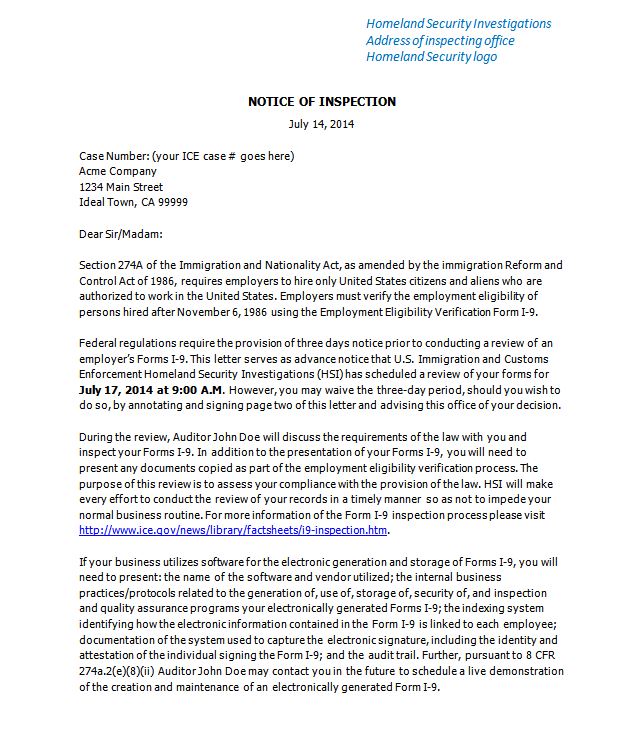
What comes to mind when you think of an ICE agent handing you a Notice of Inspection? (ICE, U.S. Immigration and Customs Enforcement, is the government’s enforcement body for Form I-9 compliance.)
If you’re like many HR execs, when you think of this scenario, questions start firing:

- What will they find?
- How bad will it be?
- How high could the fine go?
- Could this lead to publicity we don’t want?
- How will this reflect on me?
A sense of dread often accompanies these questions.
Get prepared now
During an ICE Form I-9 inspection, you have three days to pull together your response package – 72 hours. This certainly does not leave you any time for reflection and strategic planning. The time to build a parachute is before you need it. And the time to lay the groundwork for the I-9 audit is before you’re served with the Notice of Inspection.
5 steps to prepare your organization
There are five steps every organization should take in advance of an I-9 audit, in order to make the best use of your 72 hours.
Step 1: Communicate your chain of command
 A Notice of Inspection (NOI) can be served to any of your locations. This means you need to have procedures in place to ensure that receiving an NOI will trigger an immediate and appropriate response from any of your locations. You should define exactly who in your organization should be notified, and what should happen if they can’t be reached.
As outlined in this post that describes The ICE I-9 Inspection Process, the NOI may be presented in person or sent via certified mail. Having a uniformed officer show up at your door usually sets off alarm bells with staff, which is good as it serves as a call to action. You want to make sure when the NOI is delivered by certified mail it sets off the same alarm bells. You want to prevent the situation where someone signs for the certified mail then puts it in a mail slot or on a desk for the right person to see when they happen to come by next. Find a way to ensure that anyone who might sign for the NOI at any of your facilities will recognize it as something that requires immediate attention.
Then make sure anyone who might receive the NOI knows exactly what to do. Typically you want the highest level person at the facility to be notified immediately, via a live conversation. Make it clear that leaving a voicemail does not fulfill the requirement. The person needs to be contacted live. Your policy should state what should happen if the right person cannot be reached live.
You also want to make sure the appropriate individuals at your headquarter office are also contacted right away. This usually includes your top HR executive, counsel, and possibly one or more others. Who is responsible for contacting each of these people? What should be the next steps if a person cannot be reached live? Think through these possible scenarios and make provisions for them in your policy. It is fairly typical for the policy to outline a chain of communications. For example, the management team at the office being audited might be responsible for alerting the appropriate people in corporate HR, who in turn are responsible for notifying counsel.
Finally, you’ll need to communicate this policy to the appropriate people at all of your locations, and find a way to keep the knowledge fresh throughout personnel changes and time.
Step 2: Identify your counsel
 You will want to engage counsel to represent you during the ICE audit. An experienced attorney will be in the best position to know your rights and advocate for those rights throughout the I-9 audit process. If you don’t have in-house counsel who will be able to represent you during the audit, you should secure appropriate external counsel in advance.
If you are drowning, it is not the right time to learn how to swim. Likewise, if you are in the throes of an I-9 audit, it is not the right time to conduct your search for good legal counsel. Do this in advance.
Step 3: Define your process for record access
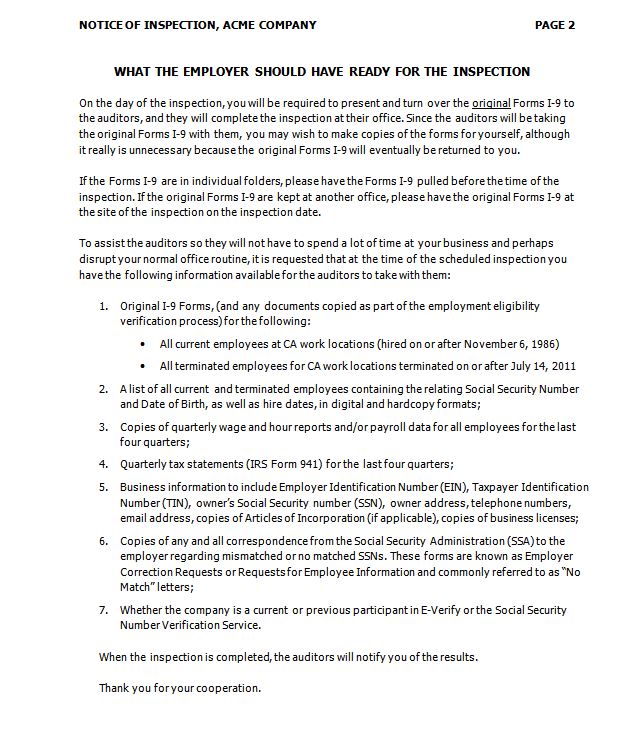
 During an I-9 audit, ICE often requires you to produce other records that allow them to corroborate your I-9s. These records typically include an employee roster, payroll reports, tax statements, articles of incorporation, and business licenses. Make sure you know in advance where this information resides, and who will be able to produce the requested reports from your various systems and files.
Who in your organization knows how to pull a report for a particular work location showing both employees who are active and those terminated in the past three years, along with hire date, termination date, SSN, birth date and possibly other information ICE may request?
Are there people in your organization who know how to pull payroll reports by location and timeframe or will you have to involve your payroll vendor? If your payroll vendor needs to be involved, what is the process to make immediate contact with the right person? How long will it take them to pull a report?
Who has access to your tax statements? Where are your articles of incorporation and business license stored?
Clear the way in advance so you know the responsible parties and the process for each information source you’ll need. Ensure that you’ll be able to get the information in less than 72 hours. It is to your advantage to get the fastest possible turnaround. The earlier in the process you get the information you need, the more time you have to look for issues and potentially repair those issues.
Step 4: Understand how your electronic I-9 vendor will support you
 If you use an electronic I-9 system, you want to understand in advance the support you will get from your vendor. Ask the vendor to outline the assistance they will provide in the event of an ICE audit. Will you have a single point of contact? What is the process for contacting that person and getting immediate attention? What is the process you will use to request the needed records? What is the vendor’s turnaround commitment for producing the requested I-9 records? You must have the records within 72 hours but the earlier you get them the better, as that will give you more time to identify issues and potentially take action to mitigate those issues.
The Notice of Inspection will typically ask you to supply information about the electronic I-9 system you use to ensure it meets the requirements for audit trails, electronic signatures and more. Ask your I-9 vendor for a copy of the information they use to fulfill this typical NOI request. If you use a vendor who serves large organizations, they will have experience helping customers through ICE audits, and the info they submit to fulfill this request has already been vetted by ICE.
Following is a list of questions that in a perfect world you asked when you evaluated your I-9 system. But if you didn’t, we recommend you ask them now, before the ICE audit:
- Does your solution log all system activity as required by ICE into ICE-compliant audit trails? At the time the Section 2 and Section 3 signatures are submitted, does your solution make a read-only copy of the I-9 with a date/time stamp? If an I-9 is changed, is a new read-only copy made upon new signature submission, with a date/time stamp?
- Please outline the regulatory requirements for electronic signatures, and verify that your solution meets them.
- Are there customers of your I-9 system who have gone through an ICE audit? If yes, please describe the audit results for records that were created in your system.
For a full list of questions to ask in order to evaluate an I-9 system, see I-9 Eval Guide: Questions You’ll Be Glad You Asked.
Also, since ICE often asks to see the change history of I-9s, make sure you can pull a summary report from your I-9 system that shows all changes across an I-9’s signing history.
Step 5: Scrub & cleanse your records
 The final step to ensure you are ready to make the best of the 72 hours you get in an ICE audit is to make sure your I-9s are ready for ICE scrutiny. This topic is covered in detail in this separate post: 3 ways to clean your existing I-9s.
This post is part of our ongoing series on ICE I-9 audits. Check back or sign up to be alerted as we cover other topics. Other posts in the series include:
Discover how Tracker’s auto-cleansing I-9 remediation solution can mend up to 74% of your paper I-9 records automatically, while you sleep.
Disclaimer: The content of this post does not constitute direct legal advice and is designed for informational purposes only.

 If you work in hospitality, food services or retail, chances are you are hiring temporary employees this summer. According to a
  Until a few years ago, this was the only option available to employers. With this approach you deploy subject matter experts to review the I-9s for errors and to manually fix the errors they find. You can use internal experts, such as I-9 specialists in HR, or external I-9 experts such as attorneys or firms that specialize in auditing and correcting I-9s. Either way, auditing and correcting I-9s by hand on a large scale is extremely expensive as the labor cost adds up very quickly. For this reason not many large employers have done it.
 A few years ago, a set of systems and services emerged that partially automate I-9 remediation. These solutions scan your paper I-9s to convert them into a digital format, then they electronically analyze the I-9s for errors. You get a report that highlights each error. The error report can be delivered in a spreadsheet, or in a system-based format that lets you click through to the records in error, as they are now in electronic format.
 A new class of electronic I-9 systems has just recently come on the market. These systems automate both the error analysis and correction. Like the systems in Approach 2, they analyze I-9 records that are scanned in from paper or imported from another electronic system. The difference is these advanced systems automatically correct a majority of the errors for you. With over half of the errors now being resolved without manual intervention, your workload is cut in half or more vs. your effort with Approach 2 described above. For the subset of records you have to touch, the time needed to fix the errors is compressed since the system spells out how to correct each error.
 In our recent webinar with U.S. Immigration & Customs Enforcement (ICE) there were a great deal of questions about the process an ICE audit takes. What happens first? Then what? What are the possible outcomes? What are the employer’s options for each?
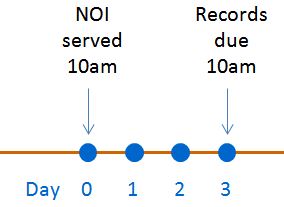 At this point you have up to three business days, 72 hours, to pull together the requested records. The NOI will give you the date and time you are required to present your package of records to the assigned ICE inspector or special agent. As you can imagine this does not give you much time! We recommend you always ask ICE for an extension. We’ll cover this and other recommendations in a future post that covers what to do immediately when you are served with a Notice of Inspection by ICE.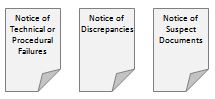
 1. Compliance Notice, or Notice of Inspection Results
 2. Warning Notice
 3. Notice of Intent to Fine (NIF)